视觉识别模块
0、学前先看&供电说明
1、固件下载与烧录
2、安装编程环境
3、调试运行例程
4、离线运行例程
5、Micropython 快速入门
6、GUI程序使用说明
7、二维云台安装教程
8、FPIOA引脚分配
9、RGB灯
10、蜂鸣器
11、按键
12、串口通信
13、I2C通讯
14、PWM
15、WDT看门狗
16、定时器计时
17、傅里叶变换
18、SHA256加密
19、AES加密
20、多线程
21、文件读写
22、图像显示
23、触摸显示
24、摄像头显示
25、图像翻转
26、照相机
27、绘制圆形
28、绘制矩形
29、绘制椭圆
30、绘制箭头
31、绘制十字准心
32、绘制文字
汝城县职业中等专业学校知识库-信息中心朱老师编辑
-
+
首页
15、WDT看门狗
 ## 例程实验效果简介 ### 1.什么是看门狗? 看门狗(Watchdog Timer)是嵌入式系统中的一种硬件定时器,主要用于系统的自我检测和恢复。它就像一个"监督者",通过定时器持续监控系统运行状态,当系统出现异常时可以自动触发系统复位。 ### 2.看门狗的工作原理 看门狗的工作原理包含以下几个关键环节: * 初始化:设置看门狗并指定超时时间 * 运行监控:"喂狗"操作定期重置计时器 * 复位触发:超时未"喂狗"则自动重启系统 ### 3\. 主要用途 * 检测并防止系统死机 * 提升系统运行可靠性 * 提供自动恢复机制 * 减少人工干预需求 ## 例程代码 本节例程代码位于【源码汇总 / 02.Basic / 08.wdt.py 】 ### 完整代码 * 注:以【源码汇总 / 02.Basic / 08.wdt.py 】文件内容为准 \# 导入必要的模块 | Import required modules from machine import WDT \# 导入看门狗模块 | Import watchdog module import time \# 导入时间模块 | Import time module """ 详细解析 | Detailed Analysis: WDT (Watchdog Timer) 是一种硬件定时器,如果在规定时间内没有被复位(喂狗), 系统就会自动重启。主要用于检测和恢复系统故障。 WDT is a hardware timer that will automatically restart the system if not reset ("fed") within a specified time. It's mainly used for detecting and recovering from system failures. """ def init\_watchdog(id\=1, timeout\=3): """初始化看门狗 | Initialize watchdog Args: id: 看门狗ID | Watchdog ID timeout: 超时时间(秒) | Timeout period(seconds) Returns: WDT对象 | WDT object 详细解析 | Analysis: 创建WDT对象,设置超时时间。如果超过timeout秒没有喂狗,系统将重启。 Creates WDT object and sets timeout. System will restart if not fed within timeout seconds. """ try: return WDT(id, timeout) except Exception as e: print(f"看门狗初始化失败 | Watchdog initialization failed: {e}") return None def feed\_watchdog(wdt, feed\_times\=3, interval\=1): """定时喂狗 | Feed watchdog periodically Args: wdt: 看门狗对象 | Watchdog object feed\_times: 喂狗次数 | Number of feeds interval: 喂狗间隔(秒) | Interval between feeds(seconds) 详细解析 | Analysis: 按照指定间隔喂狗指定次数。这个过程会持续 feed\_times \* interval 秒。 Feeds the watchdog specified times at given intervals. This process will last for feed\_times \* interval seconds. """ if not wdt: return try: for i in range(feed\_times): time.sleep(interval) \# 等待指定时间 | Wait for specified interval wdt.feed() \# 喂狗操作 | Feed the watchdog print(f"第{i+1}次喂狗 | Feed watchdog {i+1} times") except Exception as e: print(f"喂狗过程出错 | Error during feeding: {e}") def main(): """主函数 | Main function 详细解析 | Analysis: 程序的主要执行流程: 1. 初始化看门狗 2. 执行定时喂狗 3. 停止喂狗等待系统重启 Main program flow: 1. Initialize watchdog 2. Perform periodic feeding 3. Stop feeding and wait for system restart """ \# 初始化看门狗 | Initialize watchdog wdt = init\_watchdog() if not wdt: return \# 喂狗循环 | Feeding loop feed\_watchdog(wdt) \# 等待重启 | Wait for restart print("停止喂狗,等待系统重启... | Stop feeding, waiting for system restart...") while True: time.sleep(0.1) \# 降低CPU占用 | Reduce CPU usage if \_\_name\_\_ == '\_\_main\_\_': main() ### 例程代码流程图 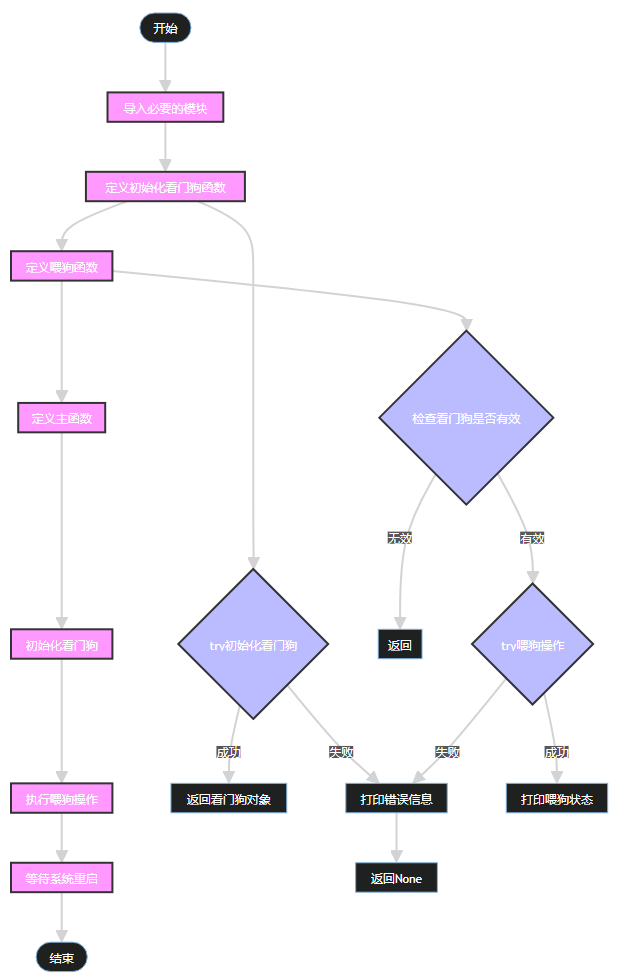
admin
2025年12月30日 14:15
转发
收藏文档
上一篇
下一篇
手机扫码
复制链接
手机扫一扫转发分享
复制链接
分享
链接
类型
密码
更新密码
有效期
Markdown文件
Word文件
PDF文档(打印)
AI